
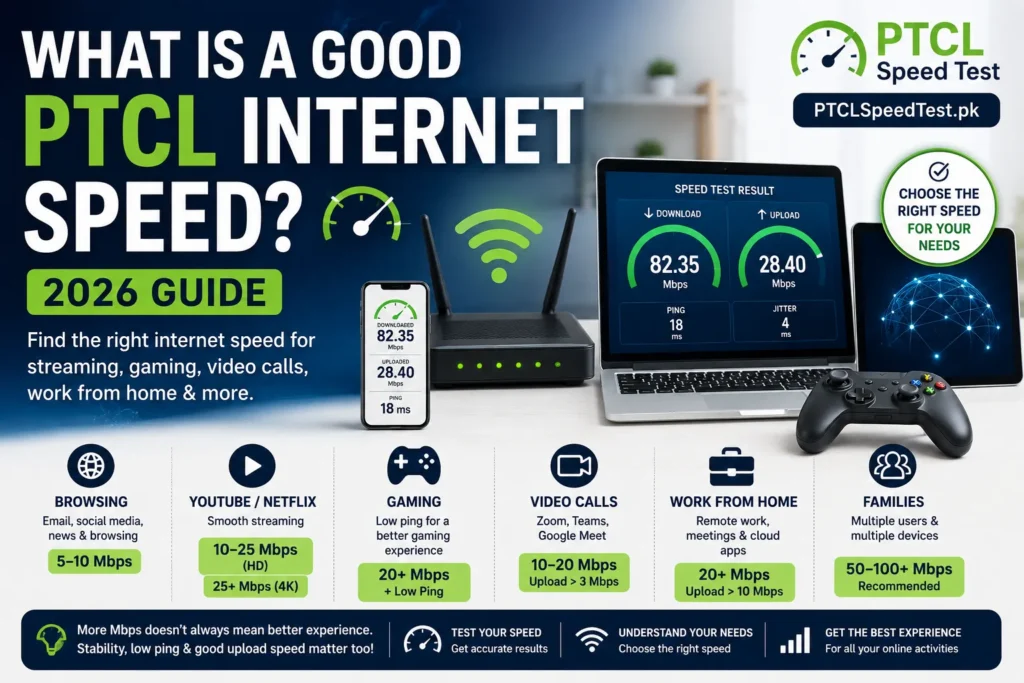
Ask five different people what counts as “good internet speed,” and you’ll get five different answers—because the honest answer is that it depends entirely on what you’re doing with it. Someone checking WhatsApp and email needs almost nothing. A house with four people gaming, streaming, and video calling at the same time needs considerably more. This guide skips the technical explanations and goes straight to the practical question: how much speed do you actually need for your specific situation?
Our recommendation is based on PTCL network behavior, real-world household usage, and common broadband requirements in Pakistan rather than theoretical maximum speeds.
| Usage | Recommended Speed |
|---|---|
| Browsing | 5–10 Mbps |
| HD Streaming | 10–20 Mbps |
| 4K Streaming | 25+ Mbps |
| Gaming | Stable connection + low ping |
| Remote Work | 20+ Mbps |
| Family (4–6 users) | 50–100 Mbps |
Table of Contents
- Why “Good Internet Speed” Depends on Usage
- Good PTCL Speed for Everyday Browsing
- Good Speed for YouTube & Netflix
- Good Speed for Online Gaming
- Good Speed for Zoom, Teams & Google Meet
- Good Speed for Families
- Recommended PTCL Packages Based on Usage
- How to Test If Your Speed Is Enough
- When Should You Upgrade Your Package?
- Frequently Asked Questions
Why “Good Internet Speed” Depends on Usage
There’s no universal number that qualifies as “good” internet speed. A speed that feels generous to one household will feel cramped in another, and the difference usually comes down to a handful of factors:
Number of users. A single person and a household of six place very different demands on the same connection, even if everyone is doing similar things.
Number of devices. Phones, laptops, smart TVs, and smart home gadgets all draw from the same shared bandwidth — often simultaneously, even when nobody’s actively using half of them.
Streaming quality. SD, HD, and 4K streaming require meaningfully different amounts of bandwidth, and the gap gets bigger the more screens are streaming at once.
Gaming. Online gaming depends less on raw speed and more on a stable, low-latency connection—a fast connection with unstable ping can still feel laggy.
Work from home. Video calls, screen sharing, and cloud-based tools rely on steady upload speed, not just download speed.
Downloads. Large downloads—games, software updates, big files—benefit from higher speed, but mostly affect how long you wait, not your everyday browsing experience.
Upload needs. Anyone doing video calls, live streaming, or uploading content to the cloud needs to think about upload speed specifically, since it’s often overlooked in favour of download numbers.
Once you know which of these apply to your household, picking a “good” speed becomes a much more concrete exercise than guessing at a number.
Good PTCL Speed for Everyday Browsing
For light daily tasks — checking email, scrolling Facebook, messaging on WhatsApp, reading news, or browsing shopping sites — the bandwidth requirement is genuinely small. These activities load small amounts of data at a time and rarely need sustained high speed.
Recommended range: roughly 2–5 Mbps is enough for a single person doing this kind of light browsing comfortably. This isn’t a hard rule — PTCL’s entry-level packages are usually built with exactly this kind of usage in mind.
If your household’s internet use rarely goes beyond this list, there’s genuinely no need to chase a higher-tier package — you’d be paying for headroom you’re not using.
Good Speed for YouTube & Netflix
Streaming is where speed needs start to climb, and the jump from SD to 4K is bigger than most people expect.
- SD (standard definition): around 3 Mbps is typically enough for smooth playback.
- HD (720p–1080p): closer to 5–8 Mbps for consistently smooth streaming without buffering.
- Full HD (1080p): similar to HD, generally comfortable in the same 5–8 Mbps range, though quality varies by platform.
- 4K: meaningfully higher, generally in the 25 Mbps+ range for a single stream, since 4K content carries far more data per second than HD.
Multiple TVs streaming at once is where households most often underestimate their needs. If two people are watching 4K content on separate screens at the same time, that’s not “double the speed of one 4K stream” in a rough estimate — it’s genuinely close to that, because each stream independently consumes its own share of bandwidth.
Buffering almost always comes down to one of two things: your speed isn’t keeping up with what’s being asked of it in that moment (too many simultaneous streams, or a stream at higher quality than your connection comfortably supports), or something temporary is interrupting a normally sufficient connection — network congestion, WiFi interference, or a busy time of day.
Good Speed for Online Gaming
Gaming is the category most people get wrong, because they focus entirely on download speed when the more important factor is usually something else.
Ping (latency) matters more than raw speed for most online games. A connection with excellent download speed but high, unstable ping will still feel laggy — inputs take longer to register, and opponents can appear to move unpredictably.
Latency and consistency matter together. A steady ping in the 20–50ms range is generally comfortable for most competitive games, while ping that jumps around unpredictably — even if the average looks fine — is often more disruptive than a slightly higher but stable number.
Not only download speed: most modern online games don’t actually require large amounts of download bandwidth to run smoothly — what they need is a stable, responsive connection. This is why someone can have a fast connection and still experience lag, or a modest connection and play smoothly, depending on ping and stability rather than headline Mbps.
This applies broadly across popular titles — PUBG, Call of Duty, Free Fire, and Fortnite on mobile or PC, as well as PlayStation, Xbox, and PC gaming more generally. The underlying principle is the same regardless of platform: a stable, low-latency connection matters more than chasing the highest download number available.
Good Speed for Zoom, Teams & Google Meet
Video calls are one of the clearest places where upload speed — not download speed — determines whether things go smoothly.
Video calls need a steady upload speed to send your video and audio out clearly. A weak upload connection is often the reason your video freezes or your audio cuts out specifically when you’re speaking.
Remote work and online classes typically involve sustained video calls, sometimes with screen sharing layered on top, which adds further demand on both download and upload simultaneously.
Home office setups with multiple people on separate calls at the same time — a common scenario in households with more than one remote worker or student — multiply this demand rather than sharing it, since each call needs its own steady stream of data in both directions.
Upload importance is easy to overlook because most package marketing emphasizes download speed. If video calls are a regular part of your day, it’s worth checking your package’s upload speed specifically, not just assuming a high download number covers you.
Good Speed for Families
Household size and device count change the calculation more than almost anything else on this list.
1 person: Light to moderate usage is usually comfortable on an entry-level package, even with occasional HD streaming.
2 people: Needs start to add up if both are active online at once — one streaming while the other is on a call, for example.
4 people: This is where households commonly start feeling a squeeze on lower-tier packages, especially during evening hours when everyone’s online simultaneously.
6+ devices: Even if only two or three people are “actively” using the internet, background devices still draw bandwidth — smart TVs on standby, phones auto-updating apps, and similar quiet background activity all add up.
Smart TVs, phones, laptops, and security cameras all count as connected devices, even when nobody’s directly interacting with them. Security cameras in particular often stream continuously in the background, which is easy to forget when estimating household bandwidth needs.
The practical rule: don’t size your package around your busiest single activity — size it around your busiest moment, when several of these are happening at once.
Recommended PTCL Packages Based on Usage
| User Type | Recommended Speed |
|---|---|
| Light User | Entry-level (browsing, email, messaging only) |
| Student | Low-to-mid tier (online classes, research, occasional streaming) |
| Family | Mid-tier and above (multiple simultaneous users and devices) |
| Gamer | Mid-tier, prioritizing stable ping over top-tier download speed |
| Remote Worker | Mid-to-high tier, with attention to upload speed specifically |
| Heavy User | Highest available tier (4K streaming, large downloads, multiple heavy users at once) |
This table intentionally avoids specific Mbps numbers and prices, since PTCL’s exact package tiers change over time. For the current speed and pricing breakdown across DSL, Flash Fiber, EVO, and CharJi, see PTCL Packages.
How to Test If Your Speed Is Enough
The only real way to know whether your current package is actually enough for your household is to test it under normal conditions, not guess from the package name alone.
Run multiple tests. A single test at one moment doesn’t reflect your day-to-day experience — run it a few times across different situations.
Test at different times. Evening hours, when more people in your area are online, often show different results than early morning or midday.
Test WiFi vs Ethernet. If your wired result is solid but your WiFi result is noticeably lower, the issue may be your router setup rather than your package being genuinely too slow.
You can run a fresh test any time on the PTCL Speed Test homepage and compare your result against your household’s actual usage pattern rather than just the number on your bill.
When Should You Upgrade Your Package?
A few consistent signs suggest it’s genuinely time to consider a higher tier, rather than troubleshooting further:
Constant buffering, even during off-peak hours and after ruling out WiFi or router issues, suggests your package may simply be undersized for your usage.
Slow downloads that consistently take far longer than expected, across multiple tests and times of day.
Many devices now regularly active at once that weren’t part of your household’s usage when you first chose your package.
Video call problems — freezing, dropped audio, or lag — that persist even after checking your upload speed and ruling out WiFi interference.
A growing family, or simply more people working or studying from home than when the package was originally chosen—usage tends to grow over time even when nothing about the connection itself has changed.
If you’re seeing these signs but aren’t sure whether the cause is your package size or something fixable in your setup, it’s worth reading Why Is My PTCL Internet Slow? first — some of these symptoms have simple fixes that don’t require upgrading at all.
Frequently Asked Questions
What is a good internet speed for a single person? For light browsing, email, and messaging, a modest entry-level speed is typically enough. Needs increase if you regularly stream in HD or make frequent video calls.
What internet speed do I need for Netflix in Pakistan? Roughly 5–8 Mbps for HD streaming, and meaningfully more — around 25 Mbps or higher — if you want smooth 4K playback.
What is a good speed for gaming? Stable, low ping matters more than high download speed for most online games. A steady connection in the 20–50ms ping range is generally comfortable for competitive play.
How much speed do I need for Zoom or Google Meet? Video calls depend heavily on upload speed being steady, not just download speed being high. Occasional freezing during calls often points to upload limitations specifically.
Is 10 Mbps enough for a family of four? It depends on what the household is doing simultaneously. If multiple people are streaming or on calls at the same time, this can feel tight — it’s worth testing during your busiest hours to see how it actually performs.
Does the number of devices affect the speed I need? Yes. Every connected device, even ones sitting idle in the background, shares the same available bandwidth, so more devices generally means needing a higher-tier package.
Do I need a different speed for PUBG or Free Fire compared to PC gaming? The core requirement is similar across platforms — a stable, low-latency connection matters more than the specific game or device.
How do I know if my current speed is actually enough? Test your connection during your household’s busiest hours, not just when the network is quiet, and compare the result against how many people and devices are active at that time.
Should I upgrade if streaming buffers occasionally? Not necessarily — occasional buffering during peak hours can be normal. Consistent, repeated buffering even during quieter hours is a stronger signal that an upgrade may help.
Is upload speed as important as download speed? For video calls, live streaming, and cloud uploads, yes — upload speed is often the more relevant number, even though download speed gets more attention.
What speed is recommended for remote work? A mid-to-high tier package with solid upload speed specifically, especially if video calls and screen sharing are a regular part of your workday.
How can I test whether my speed matches what I’m paying for? Run a PTCL speed test and compare the result to your package’s advertised speed, ideally testing more than once and at different times of day.
Does WiFi affect my internet speed?
Yes. Weak WiFi signals, interference, router placement, and older devices can reduce the speed you receive even if your PTCL package is working correctly.
Still unsure whether your connection is fast enough? Run our PTCL Speed Test, compare the results with this guide, and identify whether you need troubleshooting or a faster package.