

A WiFi connection that drops every few minutes is one of the more frustrating internet problems, precisely because it doesn’t feel like a clean “broken” or “working” situation — it works, then it doesn’t, then it works again. That inconsistency makes it harder to diagnose than a connection that’s simply slow or simply offline. This guide walks through the most common reasons PTCL WiFi disconnects intermittently and twelve practical fixes, roughly in the order worth trying them.
💡 Check Your Internet First
Before trying the fixes below, run a PTCL Speed Test to confirm whether your connection is actually unstable or simply slower than expected. This gives you a baseline before making any router changes.
Table of Contents
Why Does PTCL WiFi Keep Disconnecting?
Unlike a connection that’s simply slow, intermittent disconnection usually points to something interrupting the link itself — rather than data just moving slower than expected. That interruption can originate in a few different places: your router’s hardware or software, interference in your home, your device’s own WiFi behavior, or occasionally something on PTCL’s side of the connection, like a DSL line issue.
Because the causes span several different layers, the fix that works for one household’s dropped WiFi won’t always be the fix that works for another’s — which is why this guide covers a range of possibilities rather than a single answer.
Signs to Pay Attention To
A few patterns can help narrow down where the problem is likely coming from before you start troubleshooting:
- Disconnections happen on all devices at once, versus just one specific device
- Drops happen at a consistent time of day, versus randomly throughout
- The router’s internet or DSL light changes color or blinks right when the drop happens
- Only WiFi devices are affected, while a wired Ethernet connection (if you have one) stays stable
- Disconnections coincide with a specific activity, like several people streaming at once
Keep these in mind as you work through the fixes below — they’ll help you recognize which cause is most likely yours.
| Problem | Possible Cause | First Action |
|---|---|---|
| WiFi disconnects completely | Router, interference, DSL issue | Restart router |
| Internet slow but connected | Congestion or package limitation | Run PTCL Speed Test |
| Only one device disconnects | Device settings | Check power saving |
| All devices disconnect | Router or PTCL line | Check router LEDs |
12 Fixes for PTCL WiFi Disconnecting
1. Restart Your Router
A restart clears temporary technical glitches and re-establishes a fresh connection, and it’s the right first step for almost any intermittent issue. See the PTCL Router Restart Guide for the full process if you haven’t done this recently.

2. Check for Overheating
Routers generate heat during normal operation, and if yours is enclosed in a cabinet, stacked under other electronics, or sitting in a poorly ventilated spot, it can overheat and become unstable. Move it to an open area with airflow on all sides, and give it time to cool down before testing again.
🔥 Touch the router carefully. It should feel warm, not excessively hot. If it’s too hot to keep your hand on comfortably, overheating may be causing instability.

3. Update Router Firmware
Outdated firmware can contain bugs that cause exactly this kind of intermittent instability. If your router’s admin panel has a firmware update option, checking for and installing an available update can resolve issues that a simple restart won’t.
⚠️ Warning
Never switch off the router while a firmware update is in progress. Interrupting the update can corrupt the firmware and make the router unusable.
4. Improve Router Placement
Weak or inconsistent WiFi signal — caused by distance, walls, or interference — can cause devices to drop and reconnect repeatedly as the signal fluctuates near the edge of range. See Best Router Placement for PTCL WiFi for a full breakdown of where to position your router and what to avoid nearby.
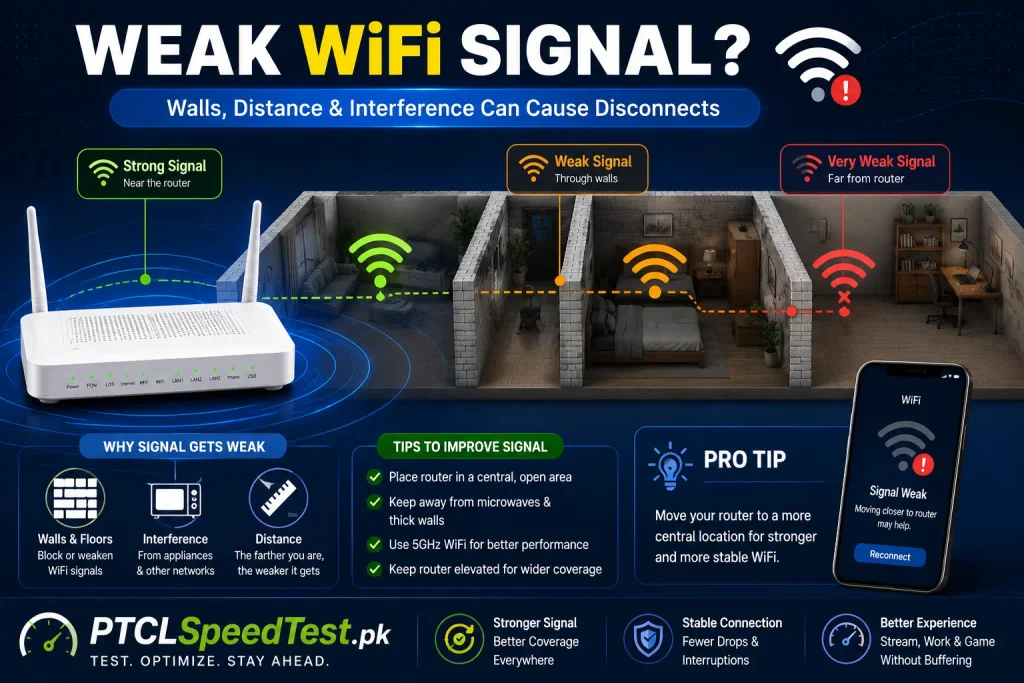
5. Reduce Connected Devices
A large number of devices actively competing for the same connection can cause instability, particularly on older or lower-capacity routers. Check Devices Connected to PTCL WiFi to see what’s actually using your network and disconnect anything unnecessary.

6. Change Your WiFi Channel
If you live in a densely populated area — an apartment building, for instance — many nearby WiFi networks can overlap on the same channel, causing interference that leads to drops. Most routers let you manually select a WiFi channel in their Wireless settings; switching to a less congested one can meaningfully improve stability.
7. Check Physical Cable Connections
A loose DSL or fiber cable, or a loose connection between the router and modem/ONT if they’re separate devices, can cause intermittent drops that look like a WiFi problem but are actually a physical connection issue. Confirm every cable is firmly seated.
8. Rule Out a DSL Line Issue
For DSL connections specifically, line quality problems — old wiring, moisture, or a degraded connection point — can cause the internet connection itself to drop periodically, which then appears as WiFi disconnecting even though the router and WiFi setup are working correctly.
9. Renew Your Device’s IP Address
Occasionally, a specific device holds onto an outdated or conflicting IP address assignment, causing it to lose connection even while other devices stay connected fine. On most devices, turning WiFi off and back on, or restarting the device itself, forces it to request a fresh IP address from the router.
10. Disable Aggressive Power-Saving Mode
Many phones and laptops include a power-saving setting that puts the WiFi radio into a reduced-activity state to save battery, which can cause the device to drop its connection more readily than it otherwise would. Checking your device’s WiFi or battery settings for anything labeled “power saving” or “WiFi sleep policy” is worth doing if only one specific device seems to disconnect more than others.
11. Change Your WiFi Password
If your network has more connected devices than you can account for, unauthorized use could be contributing to instability alongside slower speeds. See How to Change PTCL WiFi Password if you suspect this is a factor.
12. Contact PTCL Support
If you’ve worked through the above and disconnections persist, especially if they’re happening at a consistent time of day or alongside a DSL/internet light change on the router, it’s a reasonable point to involve PTCL support — ideally with notes on when the drops happen and what you’ve already tried.
13.Check Router Power Adapter
Sometimes the issue isn’t the router—it’s the power adapter.
A faulty adapter can supply unstable voltage, causing random router restarts and WiFi drops.
If the adapter becomes unusually hot, produces noise, or the router reboots unexpectedly, consider replacing it with the correct original adapter.
This is a very practical real-world fix.
Understanding the Cause Behind Each Fix
It helps to group these twelve fixes by what they’re actually addressing, since that makes it easier to skip straight to what’s likely relevant to your situation:
| Category | Relevant Fixes |
|---|---|
| Router hardware/software | Restart, overheating, firmware update |
| WiFi signal and interference | Placement, channel change |
| Network load | Reducing connected devices, password change |
| Physical connection | Cable check, DSL line issue |
| Device-specific | IP renewal, power-saving mode |
| Beyond your control | PTCL line/service issue |
If disconnections affect every device at once, the cause is more likely router- or line-related. If it’s isolated to one device, the cause is more likely specific to that device’s settings.
When It’s Likely a Router Issue
A few signs point more specifically toward the router itself:
- The router’s own lights show something abnormal at the same time as the disconnect
- A restart temporarily fixes it, but the problem returns after a period of time
- The router feels warm to the touch or is in a poorly ventilated spot
- The issue started after a period of the router running continuously for a long time without a restart
When It’s Likely a Line or ISP Issue
A few signs point more toward something outside your home network:
- Disconnections happen even immediately after a fresh restart
- The DSL or internet light on the router changes state right when the drop occurs
- The issue happens at a consistent time of day, suggesting a pattern tied to network conditions rather than your own equipment
- A wired Ethernet test shows the same drops as WiFi, ruling out WiFi-specific causes entirely
If these patterns match your situation, Why Is My PTCL Internet Slow? covers a broader troubleshooting sequence that includes when it’s appropriate to involve PTCL support directly.
Common Mistakes
- Assuming it’s always a router problem without checking cable connections first
- Resetting the router immediately instead of trying a simple restart first
- Not checking whether the issue affects all devices or just one, which changes where the fix should be focused
- Ignoring router placement as a factor, even when the router sits in an obviously poor spot
- Giving up after one fix rather than working through the list, since disconnection issues sometimes have more than one contributing cause at once
⚠️ Warning If your router feels noticeably hot, is placed in an enclosed space, or has been running continuously for an extended period without a break, don’t ignore this as a minor detail — overheating is a genuinely common and often-overlooked cause of intermittent disconnection.
Troubleshooting Table
| Symptom | Most Likely Cause | Fix to Try First |
|---|---|---|
| All devices drop at once, router light blinks | Line or router hardware issue | Restart router, check cables |
| Only one device disconnects repeatedly | Device-specific setting | Check power-saving mode, renew IP |
| Drops happen mainly in one room | Weak signal in that area | Review router placement |
| Drops happen mostly in the evening | Network congestion or interference | Try a different WiFi channel |
| Router feels warm, placed in a cabinet | Overheating | Relocate to open, ventilated space |
| Frequent drops despite a fresh restart | Line-level or ISP issue | Contact PTCL support |
💡 Pro Tip Keep a simple note of when disconnections happen — time of day, which devices, and whether the router light changes. This pattern is often the fastest way to identify the real cause, and it’s genuinely useful information if you end up needing to contact PTCL support.
Ready to Fix Your WiFi?
Once you’ve worked through the fixes above, confirm things are actually stable rather than just assuming they are. Run a PTCL Speed Test a few times over the next day to check for consistency, and keep an eye on whether disconnections return. If instability continues despite trying these steps, reviewing your connected devices list and considering PTCL Packages to confirm your current plan still fits your household’s usage are reasonable next steps.
Ready to Stop WiFi Disconnects?
Work through the fixes one by one instead of changing multiple settings at once. After each change, run a PTCL Speed Test and monitor your connection for a few hours.
If the problem continues, review:
• PTCL Router Restart Guide
• Best Router Placement
• Check Devices Connected to PTCL WiFi
• Why Is My PTCL Internet Slow?
Frequently Asked Questions
Why does my PTCL WiFi keep disconnecting randomly? Common causes include router overheating, outdated firmware, weak signal due to placement, network congestion, or occasionally a DSL line issue — the pattern of when it happens usually points toward the specific cause.
Does restarting the router fix disconnection issues? Often, yes, especially if the cause is a temporary technical glitch. If the problem returns quickly after a restart, a different underlying cause is more likely.
Can too many connected devices cause disconnections? Yes. A heavily loaded network, especially on older router hardware, can become less stable as more devices compete for the same connection.
Why does my WiFi disconnect only on one device? This usually points to a device-specific setting, such as an aggressive power-saving mode, rather than a router-wide issue.
Can router overheating cause disconnections? Yes. A router placed in an enclosed or poorly ventilated space can overheat and become unstable, leading to intermittent drops.
Does changing the WiFi channel actually help? It can, particularly in densely populated areas where many nearby networks overlap on the same channel and cause interference.
Is this a router problem or a PTCL problem? It depends on the pattern. If disconnections happen even on a fresh restart, or affect a wired connection too, it’s more likely a line-level issue rather than your router or WiFi setup.
How do I know if it’s a DSL line issue? Signs include disconnections that persist despite restarting, and a DSL or internet light on the router changing state right when the drop happens.
Should I reset my router if it keeps disconnecting? Try a simple restart first — a full factory reset erases your settings and isn’t usually necessary unless a restart alone hasn’t helped.
Can old router firmware cause disconnections? Yes. Outdated firmware can contain bugs that affect connection stability, and updating it can resolve issues a restart alone won’t fix.
Does WiFi disconnect more at certain times of day? It can, particularly during peak evening hours when more devices across your area are active, increasing congestion and interference.
Can a weak WiFi signal cause disconnections instead of just slow speed? Yes. A signal near the edge of usable range can cause a device to repeatedly drop and reconnect rather than simply running slower.
Should I contact PTCL support immediately? It’s more useful to work through router-side fixes first, and contact PTCL if the issue persists — ideally with notes on when it happens and what you’ve already tried.
Can changing my WiFi password fix disconnection issues? It can, if unauthorized devices were contributing to network overload — though it won’t help if the cause is unrelated to device load.
Does Ethernet disconnect the same way WiFi does? If a wired connection shows the same drops as WiFi, that’s a strong sign the issue isn’t WiFi-specific and likely involves the router or the line itself.
How long should I test after trying a fix before assuming it worked? Give it at least a few hours, ideally spanning different times of day, since some causes — like congestion — are time-dependent and won’t show up in a short test window.