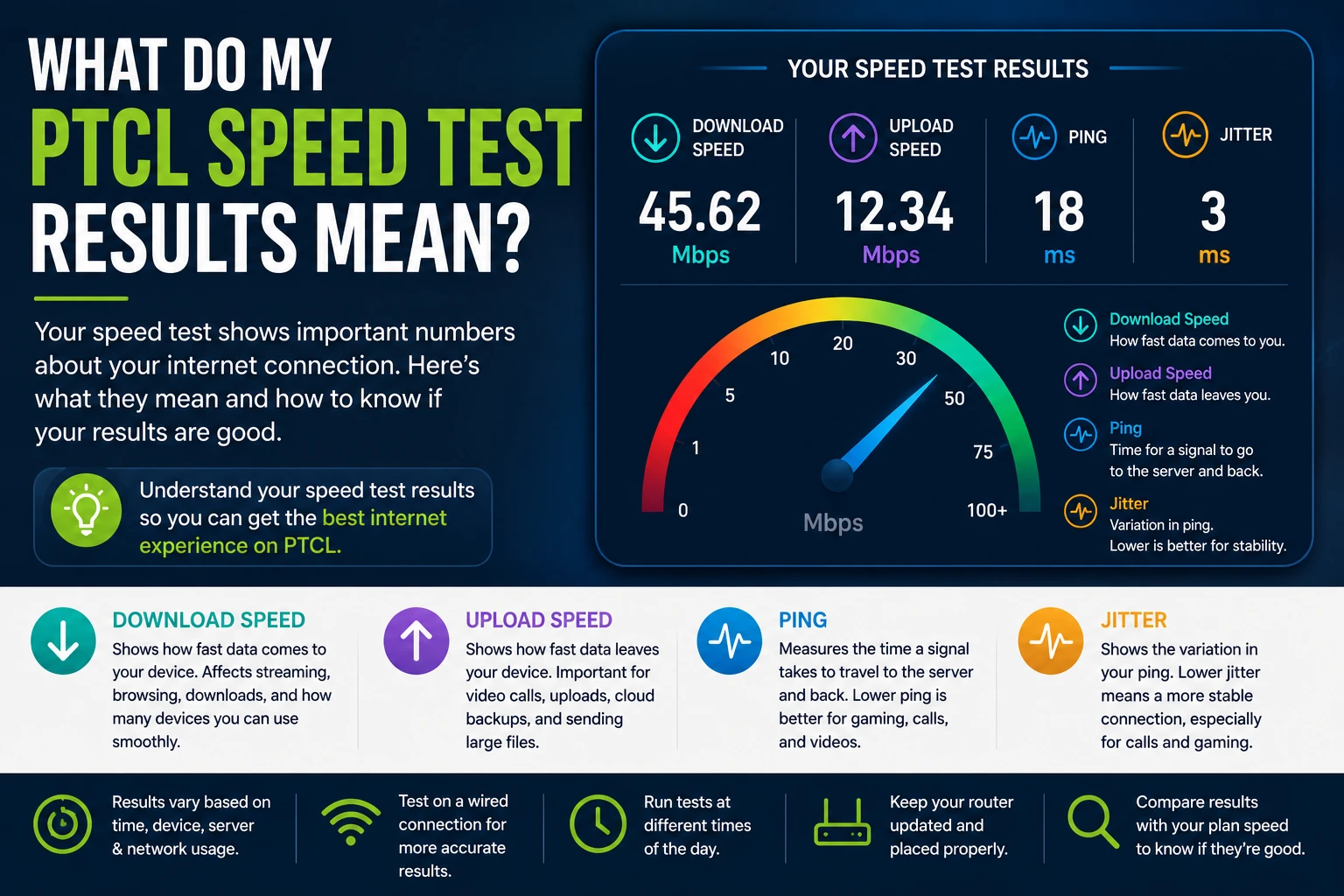
Running a speed test is easy. Understanding the results is where most people get confused. Now you’re staring at three numbers—and none of them mean much if you don’t know what you’re looking at. A “45” next to download speed sounds fine until you realize you don’t know what it’s being measured against, or why your ping matters just as much as your download number.
This guide breaks down exactly what each result means, what counts as good for your situation, and why your number can change from one test to the next even when nothing about your connection has actually changed.
Table of Contents
- What Does a PTCL Speed Test Measure?
- Understanding Download Speed
- Understanding Upload Speed
- Understanding Ping
- Understanding Jitter
- Why One Speed Test Isn’t Enough
- How to Know If Your Result Is Good
- Common Reasons Results Change
- When Should You Worry?
- How to Get More Accurate Speed Test Results
- Frequently Asked Questions
What Does a PTCL Speed Test Measure?
A speed test measures how your connection performs right now, between your device and a nearby test server. It isn’t measuring your entire internet experience — it’s measuring four specific things: how fast data comes to you, how fast data leaves you, how long a signal takes to travel back and forth, and how consistent that timing is.
Those four measurements are download speed, upload speed, ping, and jitter. Together, they give you a snapshot — not a permanent score, but a reading of your connection’s condition at that exact moment, on that exact device, under that exact network load.
Understanding each one individually is what turns a confusing set of numbers into something you can actually act on.
Understanding Download Speed
Download speed measures how quickly data travels from the internet to your device, expressed in Mbps (megabits per second). This is the number most people fixate on, and for good reason — it’s what determines how smoothly you can stream video, load web pages, download files, and run multiple devices at once.
A higher download speed means less waiting: pages load faster, videos buffer less, and file downloads finish sooner. But download speed isn’t something to judge in isolation. A DSL connection, Netflix, YouTube, Zoom, Teams, Cloud Backup, and a Flash Fiber connection can both report a technically “good” download number while feeling completely different in daily use, because fiber tends to sustain that speed more consistently under load, while DSL can dip depending on distance and line conditions.
If your download number seems low, the first question isn’t “is PTCL broken” — it’s “what should this number actually be for my plan?” That comparison matters more than the raw figure.
Understanding Upload Speed
Upload speed measures the reverse — how quickly data leaves your device and reaches the internet. It matters for video calls, uploading 1GB files, Google Drive, WhatsApp backups, etc., backing up photos to the cloud, live streaming, and increasingly, remote work tools that sync in real time.
Most broadband connections, PTCL included, are designed with upload speeds lower than download speeds, since the typical household downloads far more than it uploads. That asymmetry is normal — it doesn’t indicate a fault. What matters is whether your upload speed is enough for what you actually do. A video call needs relatively little upload bandwidth; uploading large project files or livestreaming needs considerably more.
If calls freeze or lag specifically when you’re speaking but not when you’re listening, a limited upload speed is often the reason.
Understanding Ping
Ping measures latency — the time it takes for a small signal to travel from your device to the test server and back, shown in milliseconds (ms). Unlike download and upload speed, lower is better here.
Ping matters most for anything happening in real time: video calls, voice calls, and online gaming. A connection with excellent download speed but high ping can still feel laggy during a call, because the delay in signal travel is what causes that half-second gap before someone responds.
Distance to the server plays a real role in ping — a server physically closer to you will almost always produce a lower, more favorable ping than one farther away, independent of how fast your actual connection is. Low ping is more important than high download speed for competitive online gaming.
Understanding Jitter
Jitter measures how much your ping varies from one moment to the next. If your ping bounces between 20ms and 90ms repeatedly, rather than staying steady, that inconsistency is jitter — and it’s often more disruptive than a consistently higher ping would be.
High jitter is why a call can sound fine for a few seconds, then break up, then sound fine again. Your average speed might look completely normal, but the inconsistency underneath it is what your ears and eyes actually notice. This is one of the most overlooked numbers on a speed test, largely because it’s not the headline metric — but for anyone who spends a lot of time on video calls, it deserves just as much attention as download speed.
Why One Speed Test Isn’t Enough
A single test result is a snapshot, not a verdict. Your connection’s performance shifts throughout the day based on how many people are online in your area, how many devices are active in your home, and even which server your test happened to connect to.
Running the test once and treating that number as the permanent truth about your connection is one of the most common mistakes people make. A result taken at 9 PM on a Friday, when household internet usage nationally is at its highest, will often look different from the same connection tested at 7 AM on a weekday.
The more useful approach is running the test a few times, across different points in the day, and looking at the pattern rather than any single number. A connection that’s consistently within range of its expected speed, with occasional dips during busy hours, is behaving normally. A connection that’s consistently far below expectation, regardless of time, points to something worth investigating.
How to Know If Your Result Is Good
Whether your result counts as “good” isn’t a fixed standard — it depends entirely on the internet plan you’re subscribed to. A result that would be disappointing on a higher-tier Flash Fiber plan might be completely normal, even excellent, for a lower-tier DSL plan.
Rather than judging your number against a generic benchmark, the right comparison is against what your specific plan promises. If you’re not sure what speed your current package is rated for, check your plan details on the PTCL Packages page before drawing any conclusions from your test result.
As a general rule: a result that lands close to your plan’s advertised speed, with ping in a range comfortable for your typical use (calls, gaming, streaming), is a healthy result — even if it’s lower than what a friend on a different plan reports.
Common Reasons Results Change
Your speed test result can shift from one run to the next for reasons that have nothing to do with a fault on PTCL’s side:
WiFi interference. Other wireless networks nearby, along with household electronics like microwaves and cordless phones, can degrade WiFi signal and pull your result down, even though your underlying connection hasn’t changed.
Peak-hour congestion. During the busiest hours of the evening, shared network infrastructure serves more users simultaneously, which can lower speeds temporarily for everyone in that area.
Background downloads. Automatic app updates, cloud backups, and game downloads running silently in the background can consume a large share of your bandwidth during a test without any obvious indication on your screen.
VPN usage. Routing your connection through a VPN adds an extra step your data has to travel through, which typically reduces speed and can increase ping — this is expected behaviour, not a malfunction.
Distance from the router. The farther your device is from your WiFi router and the more walls or floors in between, the weaker your signal — and the lower your test result will read, regardless of your actual plan speed.
Server location. Speed tests connect to a specific test server, and a server that’s geographically farther away will generally show a higher ping and sometimes a lower speed than one nearby, even on an identical connection.
Old hardware. Ageing routers, especially those that don’t support current WiFi standards, can become a bottleneck of their own, capping your result below what your actual internet plan is capable of delivering.
Browser issues. A browser with too many open tabs, outdated software, or heavy extensions running can slow down how a test result is measured and displayed, independent of your real connection speed.
When Should You Worry?
Not every low or inconsistent result is cause for concern, but a few patterns are worth paying attention to.
It’s worth investigating further if your result is consistently and significantly below your plan’s promised speed across multiple tests, at different times of day, and after ruling out the common causes above. It’s also worth looking into if your connection drops out entirely rather than simply slowing down or if you notice a sudden, lasting change in performance with no obvious explanation like a new device or a software update.
On the other hand, occasional dips during peak evening hours, or a lower reading on a device sitting far from the router, are expected behaviors rather than something to escalate.
If you’ve worked through the likely causes and the problem persists, the troubleshooting steps in Why Is My PTCL Internet Slow? walk through a structured way to narrow down the cause before contacting support.
How to Get More Accurate Speed Test Results
A few adjustments make your test results meaningfully more reliable:
- Close other browser tabs, apps, and any active downloads before testing.
- Test after restarting the ONT/Router
- Test on a wired Ethernet connection when possible, to remove WiFi variability from the picture entirely.
- Run the test at more than one time of day, rather than relying on a single result.
- Pause VPN connections unless you specifically want to test performance through the VPN.
- Restart your router before testing if it’s been running for an extended period without a reboot.
- Compare your wired result against your WiFi result — a meaningful gap between the two tells you the issue is your WiFi setup, not your underlying connection.
Common Speed Test Mistakes
- Running a test over VPN
- Streaming while testing
- Testing far from router
- Testing only once
- Wrong server
You can run a fresh test any time on the PTCL Speed Test homepage.
Frequently Asked Questions
What is a good download speed for PTCL?
It depends on your specific package. The right benchmark is your plan’s advertised speed, not a generic number—check your package details to know what to expect.
Why is my upload speed lower than my download speed?
This is normal. Most broadband plans, including PTCL’s, are designed with higher download speeds than upload speeds, since most household usage involves downloading far more data than uploading it.
What ping is good for gaming or video calls?
Lower ping is generally better for anything real-time. A stable, low, consistent ping matters more than an occasional low reading — which is why jitter is worth checking alongside ping, not instead of it.
Why does my speed test result change every time I run it?
Network conditions shift constantly — how many devices are active, how busy your area’s network is, and which server you connect to can all cause results to vary between tests, even minutes apart.
Does the server location affect my results?
Yes. A test server that’s physically closer to you will typically show a lower, more favourable ping, and sometimes a higher speed reading, than a distant server.
Should I test on WiFi or a wired connection?
Both, if you can. Testing on a wired connection isolates your actual internet speed. Testing on WiFi as well shows you what your devices are actually experiencing day to day.
Is jitter as important as ping?
For anything real-time, yes. Jitter measures how consistent your connection is, and inconsistent timing can be more disruptive to a call or a game than a steady, slightly higher ping.
Can old routers affect my speed test results?
Yes. An outdated router can become the limiting factor in your connection, showing a lower result than your actual internet plan is capable of delivering.
How often should I run a speed test?
There’s no fixed rule, but testing periodically — and especially whenever something feels off — gives you a baseline to compare against if a real problem develops later.
What should I do if my results are consistently low?
Start by ruling out the common causes covered above. If the problem persists across multiple tests and times of day, the next step is working through a structured troubleshooting process, covered in Why Is My PTCL Internet Slow?